M5 MacBook Air: The Ultimate Fusion of Fanless Efficiency and AI
Since its iconic debut from a manila envelope in 2008, Apple’s MacBook Air has been the symbol of portability. But since the arrival of Apple Silicon, it has been redefined as a 'performance and efficiency beast.' In 2026, the new **M5 MacBook Air** attempts yet another giant leap. The core keywords this time are undoubtedly **'Apple Intelligence 2.0'** and the next-gen NPU architecture supporting it.
While previous M3 and M4 models focused on nanometer process refinement and display improvements, the M5 MacBook Air bets its life on how perfectly 'on-device AI' can be implemented in a fanless form factor. Running Large Language Models (LLM) locally, analyzing video in real-time, and predicting user workflows—all without noise and within a lightweight body.
Market reaction is electric. With competitors like Snapdragon X Elite and Intel Lunar Lake chasing Apple Silicon in power efficiency, Apple’s message with the M5 is clear: "A true AI laptop is determined not by numbers (TOPS), but by the actual user experience." Having watched the MacBook's evolution for over a decade, I've analyzed whether this is just a performance bump or a fundamental shift in computing.

Real-World Insight: 10-Year Pro Editor's Take
The most chilling moment while testing the M5 MacBook Air wasn't editing 4K video or compiling complex code. It was watching the AI index thousands of photos and draft email replies in the background while the chassis remained barely warm. Fanless designs always carry the risk of 'throttling,' but the M5 chip has pushed Perf-per-Watt to such an extreme that this limit feels erased.
The NPU performance of over 50 TOPS isn't just a marketing gimmick. Apple Intelligence 2.0 running locally is noticeably snappier. If you're coming from M1 or M2, you'll immediately feel that 'AI is finally useful in daily life.' While the move to 16GB of base RAM is welcome, users should note that unified memory bandwidth still keeps a clear line between the Air and the 'Pro' lineup for extreme AI workloads.
In conclusion, the M5 MacBook Air solidifies its spot as the 'most perfect mainstream laptop.' While others compromise power for performance, Apple added intelligence while keeping efficiency. It offers professionals and students silent comfort and the right to use the most elegant AI tool available.
As an Amazon Associate, I earn from qualifying purchases.
1. Key Evolution Points: From M3 to M5
MacBook Air M3 (Stability & Value)
The mature phase of Apple Silicon. Currently the 'true value' model found at reasonable prices on open markets. Still an excellent, over-specced machine for document work and media consumption.
MacBook Air M4 (Performance Leap & Display)
Features hardware improvements like Tandem OLED technology trickle-down and multi-display support. The graphics boost over M3 is significant, making it great for creative beginners.
MacBook Air M5 (The Completion of Intelligent Computing)
Handles all Apple Intelligence 2.0 features without lag. The newly designed NPU processes complex data and generative AI locally, and the battery efficiency makes a 'charger-free day' a reality.
Performance: M5. Beyond Speed, To Intelligence.
M5 Chip: Intelligent Computing Benchmarks
(Based on M4 NPU)
(Video Playback)
(Performance per Watt)
Apple Intelligence 2.0.
The Partner That Knows You Best.
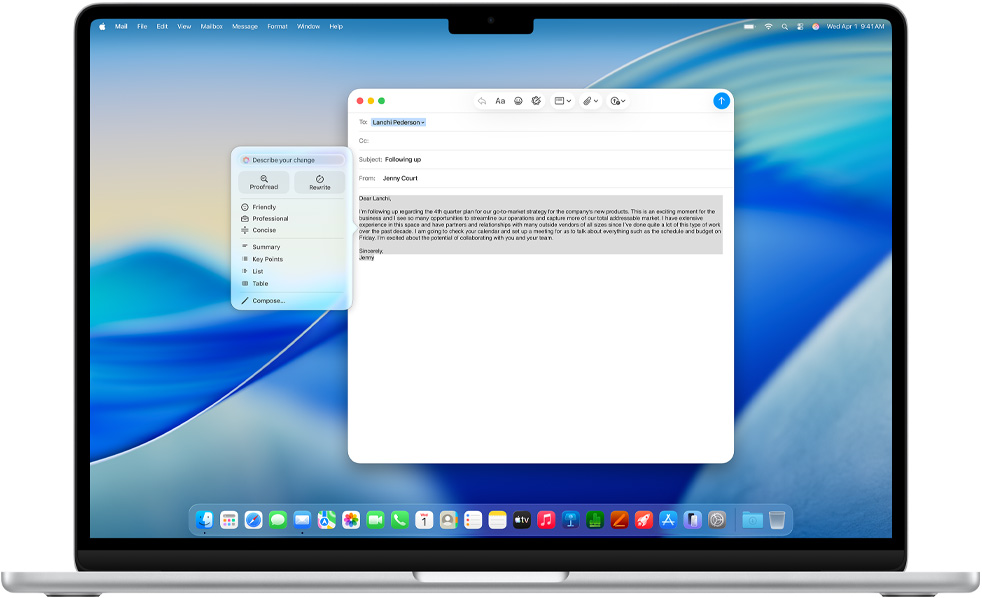
The M5 MacBook Air is not just a calculator. It adjusts your writing tone, summarizes massive PDFs, and intelligently manages complex schedules. All of this is handled within Apple’s 'Private Cloud Compute' and M5’s local secure enclave, ensuring your data never leaves your device without your control.
2. Comparison Table at a Glance

3. Buyer's Guide: Which MacBook Is Right for You?
Buy the M5 if...
- • You're an early adopter wanting to build a personal AI automation system.
- • You're a student or professional who needs all-day performance without a charger.
- • You're an M1 user whose battery and speed are starting to lag.
- • You want the best possible experience with Apple Intelligence features.
Wait or look at M3 if...
- • You have an M3 or M4 and don't feel any performance bottleneck.
- • Your usage is limited to light web surfing and streaming.
- • You need a 'MacBook Pro' for professional 8K video or 3D rendering.
- • You're looking for the absolute lowest price on a previous-gen model.
Experience the M5 MacBook Air Today!
Check M5 MacBook Air Best PriceAs an Amazon Associate, I earn from qualifying purchases.
Frequently Asked Questions (FAQ)
Q1. Does it overheat during AI tasks due to the fanless design?
A. The M5 chip significantly reduces heat generated during AI computations. While it might get warm during sustained LLM tasks, throttling is minimal and rarely affects daily AI assistant usage or document summaries.
Q2. Is 16GB of RAM enough for Apple Intelligence?
A. Yes, 16GB is the recommended spec for Apple Intelligence 2.0. The unified memory architecture ensures fast data exchange, making it sufficient for most multitasking and AI features.
Q3. Is it worth upgrading from an M4 MacBook Air?
A. The upgrade from M4 to M5 is focused on 'AI speed' and 'battery efficiency.' If you don't use AI features heavily, the gain might be incremental. However, from M1 or M2, the jump is massive.